
Softwarev1.0Public
VideoProc Converter AI 8.10 [Multi]

VideoProc Converter AI 8.10 [Multi]
Program version: 8.10
Official website: Digiarty Software, Inc
Interface language: English, German and others
Treatment: included
Type of medicine: adding files, replacing files
System Requirements:
Description:
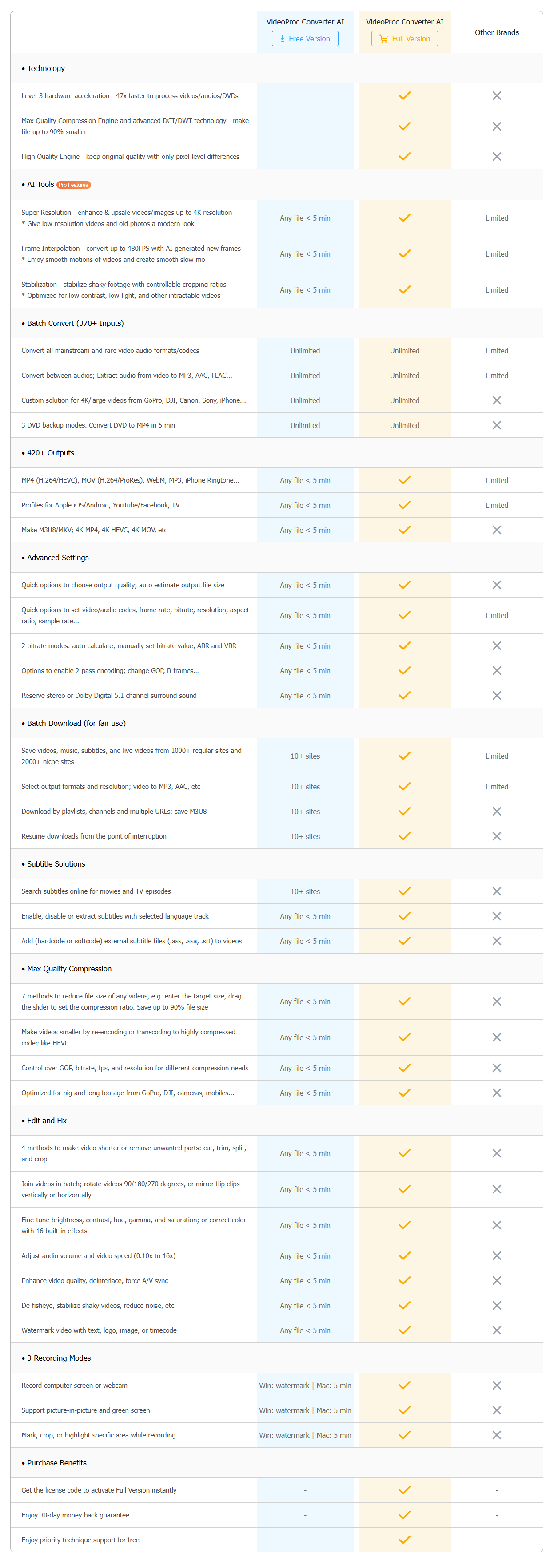
WinX VideoProc Converter is a multifunctional all-in-one video processing program designed for editing, cutting, cropping, merging, adjusting, converting and compressing (4K) video with full hardware acceleration.
The program deals not only with video processing, but also images and audio files.
Screenshots:
Distribution time: until the first 5-7 downloaders appear
Program version: 8.10
Official website: Digiarty Software, Inc
Interface language: English, German and others
Treatment: included
Type of medicine: adding files, replacing files
System Requirements:
- Windows 7, Windows 8/8.1, Windows 10, Windows 11 (64-bit)
- 1 GHz Intel® or AMD® processor (Minimum)
- 1GB RAM (Recommended: 2GB or above)
- 200MB of hard-disk space for installation
- Internet access to download AI models while working.
Description:
WinX VideoProc Converter is a multifunctional all-in-one video processing program designed for editing, cutting, cropping, merging, adjusting, converting and compressing (4K) video with full hardware acceleration.
The program deals not only with video processing, but also images and audio files.
- The program includes 4 modules:
- Video converter to various formats AVI, AVCHD, MP4, FLV, AVC, MPEG, WMV, MOV, MKV, etc.
- DVD Ripper for converting to various formats or copying in original quality
- Online video or audio downloader with saving in various formats
- Video recorder for recording video from a PC screen or webcam with the ability to additionally insert voice, text, drawings and various objects during recording.
Featuring 3x Level-3 hardware acceleration technology, it makes the most of the GPU; Intel QSV, NVIDIA CUDA/NVENC and AMD for ultra-fast video encoding and decoding, speeding up video processing up to 64 times faster!
Supported Formats
Video conversion
Audio conversion
DVD
- A specialized video converter for transcoding, remixing without transcoding (automatic copying), compressing media files, changing the container and managing codec settings.
- Convert over 370 input formats to over 420 output formats
- Video to video, video to audio, audio to audio
- Support for new codecs such as AV1, ProRes, HEVC and VP9
- Convert 3D stereoscopic video to 2D; 360-degree and VR video conversion
- Convert Video to GIF, Convert GIF to Video
- Codec settings: 2-pass encoding, GOP, B-frame settings, tag/metadata editor
- MKV creation
- Automatic copying (remultiplexing)
- Special compressor for simple (batch) video compression without loss of quality
- Batch tasks to save time
Audio conversion
- Built-in specialized audio converter
- Input formats: A52, AAC, AC3, AIF, AIFF, AMR, ANX, AOB, APE, AQT, ASX, AXA, DTS, FLAC, M2A, M4A, MKA, MLP, MOD, MP1, MP2, MP3, MPA, MPC, OGA, OGG, OMA, RA, RAM, SPX, TTA, VOC, VQF, WAV, WMA, WV, XA, XM, etc.
- Output formats: MP3, M4A, WAV, FLAC, AAC, OGG, AC3, AIFF, CAF, M4R
DVD
- DVD copying and cloning; creating an ISO image
- DVD Backup: Main Copy, Partition Copy, ISO, VIDEO_TS
- Convert DVD to MKV, MP4, MOV, WebM, etc.
[Видео] Super resolution
[Видео] Frame interpolation
[Видео] Video stabilization
[Изображение] Ultra high resolution
[Изображение] Facial restoration
[Изображение] Coloring an image
AI for audio
- "Gen Detail" V3 - a new model for generating fine details: skin, fabric and natural textures with Retina-level clarity
- Upscale old, grainy videos, DVDs and low-resolution recordings by up to 400% to HD/4K
- Get natural results without compression/decoding artifacts, pixelation or blocking
- Revive anime, games, GoPro and drone videos, DVDs, VHS/DV rips, wildlife documentaries and old footage
[Видео] Frame interpolation
- Convert low frame rate videos to high frame rate videos with AI generated frames
- Combine 24/25/30fps video into 60/120/240fps video
- Intelligent scene change detection to prevent jello effect and strange artifacts
- Ideal for creating ultra-smooth slow-motion videos, processing old recordings, sped-up videos, animations or everyday recordings
[Видео] Video stabilization
- Easily fix shaky video and get a clear picture
- Stabilization mode and ready-made “Steady” settings for any situation
- Customize edge preservation with dynamic crop options
- Real-time preview for accurate and fast adjustments
[Изображение] Ultra high resolution
- Gen Detail model version 3 for generating complex details: leather, fabric and other elements with Retina-level clarity. Updated
- Upscale image/AI art resolution to 8K/10K with lifelike details
- Restoration, noise removal, removal of JPEG compression artifacts, deblurring and sharpening of images
[Изображение] Facial restoration
- VideoProc Converter AI: Face Recovery - New Feature
- Face restoration uses artificial intelligence to correct, deblur, and sharpen images for clearer faces
- Add realistic detail to skin, eyes, lips and hair while maintaining facial features
- Eliminates stains, scratches and noise. Ideal for low-resolution portraits, old photos and group shots
[Изображение] Coloring an image
- VideoProc Converter AI: New Image Colorization Feature
- Colorize black and white, monochrome or faded photos with one click using AI
- Pinpoint colors to bring objects, clothing, and landscapes back to life
- Simple workflow: upscaling, coloring, restoring faces and enhancing images in one go
AI for audio
- Separate vocals and instruments in video and audio files with Vocal Remover
- Create karaoke tracks, get clean background music or extract acapella tracks
- Reduce background noise in audio and video recordings with Noise Reduction
- Eliminate traffic noise, wind, hiss and ambient background noise
- Raise audio levels for clearer content
- Ideal for vlogs, podcasts, interviews, recordings, online courses, etc.
Video editing
Video repair and improvement
Chronology and accuracy of installation
Video effects
Texts and subtitles
Quick Edit
Editing Color
Chroma key (green screen)
Audio editing
Utilities and editing
Improved sound quality
For VideoProc Converter AI (Windows version 8 and above)
Video repair and improvement
- Fisheye removal, de-interlacing, sharpening, low-light video correction, black bar removal, audio/video synchronization
- Removing noise from audio (background noise, wind noise, hum, etc.)
Chronology and accuracy of installation
- Split, merge, cut, trim, crop
- Rotate, mirror and flip, zoom in, zoom out
- Full screen
- Extract audio, mute video
- Snapshot: Image Sequence Extraction
Video effects
- 20 video effects
Texts and subtitles
- Add subtitles in ass, ssa, srt format to video
- Extract subtitles from video
Quick Edit
- Constant speed: 1/10x to 16x
- Play in reverse
Editing Color
- Brightness, contrast, hue, saturation, gamma
- Add noise, invert, convert to grayscale and some filters
Chroma key (green screen)
- Remove only green background from webcam recording
Audio editing
Utilities and editing
- Adjust volume/mute sound in video
- Extract audio from video
- Change audio channel
- Enable audio track selection for video with multiple audio tracks, extract one or more audio tracks
Improved sound quality
- For VideoProc Converter AI (Windows version 7.3 and below)
- Reduce noise in the audio track of video files
- Synchronize audio with video
For VideoProc Converter AI (Windows version 8 and above)
- All features of previous versions
- New: Audio AI for audio and video files (noise reduction and more)
Dictaphone
Screenshot
- Record audio with or without screen recording, whatever suits your needs
- Record system and microphone audio
Screenshot
- Record screen, webcam, and simultaneously record screen and webcam
- Recording computer system sounds and/or microphone sounds during video recording
- Convenient features while recording:
- Draw and add annotations in real time
- Ability to display mouse clicks and keystrokes
- Chroma key to change the webcam background
- Draw and add annotations in real time
Built-in bootloader
- Download videos and music from over 1,000 sites, keep YouTube videos within permitted use.
- Create M3U8 playlists, download M3U8 files, convert M3U8 to MP4, MOV and other formats.
- Batch download videos via playlists
- The loading mechanism is regularly optimized to ensure maximum performance
- Added
- In the “Face Restoration” section in Image AI, a new section “AI Models” has been added, which contains 3 models:
- The Rebuild model provides a high level of naturalness with a balanced restoration of parts; it is optimized for images with partially damaged but recognizable facial features.
- The Fidelity model provides superior fidelity by accurately restoring contours and key details; it is ideal for sharp images that require precise reproduction.
- The "GFPGAN" model provides visually appealing facial enhancement, especially for low-resolution or slightly blurry images.
Improved - The Rebuild model provides a high level of naturalness with a balanced restoration of parts; it is optimized for images with partially damaged but recognizable facial features.
- Face recognition algorithms to more efficiently process overly large areas of the face, increasing recognition accuracy.
- Super Resolution performance on low-end GPUs to provide more stable performance and prevent black screen issues.


| [ NullPk]_VideoProc Converter AI 8.10.torrent | ||
Torrent:  |
Registered |
Register and download torrent! 915B  |
| Registered: | 08 Apr 2026 19:54:54 | |
| Size: | 438 MB () | |
| Rating: |  (Voices: 33) |
|
| Thanked: | 104 | |
| Examination: | Design verified by moderator 08 Apr 2026 19:59:17 | |
| How to download · How to distribute · Correctly format · Raise the ratio! | ||
Download